
Step-by-step guide to creating a Lookahead filter in Primavera P6
Introduction :
One Lookahead filter in Primavera P6 is a very useful tool for project managers and planners, as it allows them to focus on the Upcoming activities during a given period, for example the 2, 4 or 6 next weeks. This filtering method makes it easier to track the short term, identify constraints and monitor the progress of the work.
This guide offers a detailed method, step by step, to create a Lookahead filter in Primavera P6, in order to better manage the short-term execution of the project.
Pourquoi utiliser un filtre d'anticipation dans Primavera P6 ?
One Lookahead Filter is essential for:
- Track activities requiring immediate attention
- Improve communication with teams, subcontractors, and stakeholders
- Identifying upcoming work over a defined period
- Anticipate constraints and avoid blockages
- Strengthen steering and proactive decision-making
Step 1: Open your Primavera P6 project
- Lancer Primavera P6
- Open the project schedule
- Go to the view Activities
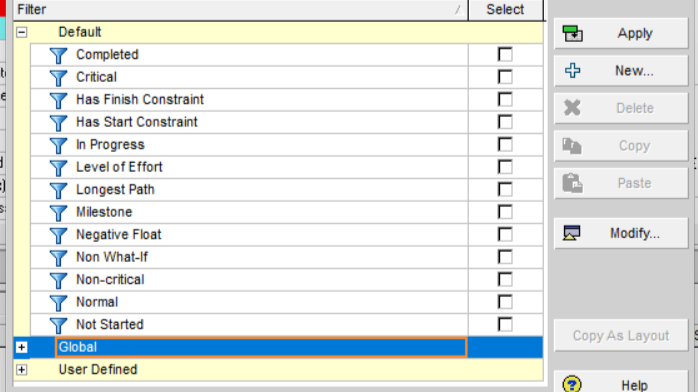
Step 2: Open the filters window
- Click the icon Filter in the toolbar
You - Go in View → Filters
The window displays the existing filters
Étape 3 : Créer un nouveau filtre
- Click on New
- Name the filter
- “Lookahead 2 weeks”
- “The Next 4 Weeks” Activities”
Use a clear and standardised name (good practice for practices)
Step 4: Define the filter criteria
Configure as follows:
- Parameter : Begin or Finish as needed
- Condition (Is) : is within range of
Define dynamic range:
- Start date : Data Date
- End Date :
- Data Date + 14 days Two weeks
- Data Date + 28 Days (4 weeks)
Example:
- Fortnight
Start is within range of Data Date to Data Date + 14 days - 4 weeks
Start is within the range of Data Date to Data Date + 28 Days
Click on Alright to save
Step 5: Apply the filter
- Click on Apply
The activities board only displays lookahead tasks
- Save filter for reuse
Stage 6: Customise the Lookahead View (advanced option)
For a professional finish:
- Adjust the scale to Gantt Chart
- Hide unnecessary columns
- Group by:
- Work Breakdown Structure
- Responsible
- Type of activity
👉 Objective: clear reading type Client report / construction site
Step 7: Save and share
- Export to Excel / PDF
- Save P6 layout
Ideal for:
- Weekly meetings
- Site coordination
- Reporting client
Conclusion
The Lookahead Filter is a key tool for:
- Steering the short term
- Anticipate constraints
- Improve field coordination
It transforms the planning into operational tool, not just as a reporting tool.
ALVID Vision (Expert level)
A good lookahead:
- Is aligned with the critical path
- Integrates the real-world site constraints
- Serves as the base for Weekly meetings & quick decisions
Paired with:
- EVM
- Risk Analysis
- Delay tracking
It becomes a Strategic short-term management tool
 Français
  English (UK)
  Español
  Italiano
  Deutsch
  Nederlands