

 Understanding the concepts and calculations of the CPM Implementing CPM in Primavera P6 A real-life case study The strategic value of CPM in project management
Let's get down to it.
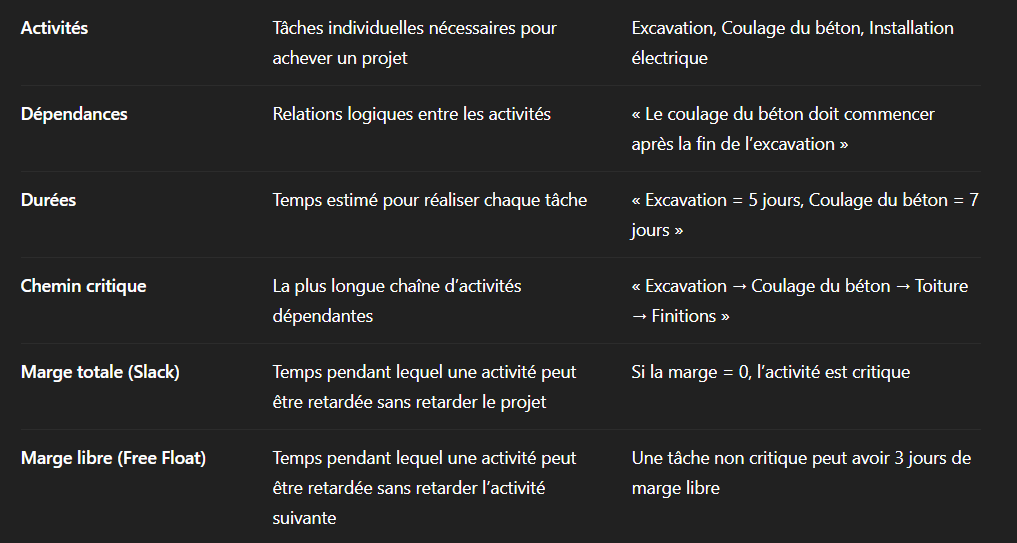
The critical path represents the longest sequence of dependent activities in a project.
If an activity on this path is delayed, the project end date is automatically impacted.
Critical Path Identification Formula:
Critical path = Longest path of the schedule (Total float = 0 days)
Project duration = Sum of the durations of the critical path activities
Primavera P6 is an enterprise-level planning tool, widely used for complex projects.
Here are the key steps for defining the critical path in Primavera P6.
Break down the project into structured lots (foundations, structure, finishes, MEP, etc.).
Example for a construction project:
Site preparation
Foundation work
Structural works
Finishes & MEP
Under each WBS item, define the detailed activities.
Example under «Foundation Work»:
Excavation
Concrete pouring
Curing and formwork removal
Define the logical relationships
Fin → Début (FS)
Beginning → Beginning (SS)
Fin
Start → End (SF)
Example:
Excavation → Pouring of concrete (Finish → Start relationship)
Example:
Excavation: 5 days
Concrete pouring: 7 days
Cure: 10 days
In Primavera:
Project → Dates → Set Start Date → Schedule (F9)
In the Gantt chart:
Customise Layout → Show Total Margin
Activities with Total Margin = 0 are criticised.
Optimisation Tools in Primavera P6
Fast-Tracking Activity overlap to reduce duration Crashing : additional resource allocation Optimisation of logic Dependencies adjustment
 Duration: 180 days Software: Primavera P6
Site preparation (10 days)
Excavation (15 days)
Foundations (20 days)
Structure (40 days)
Roofing & Facades (25 days)
MEP Installation (30 days)
Interior finishing (35 days)
Collection & return (5 days)
Site preparation → Excavation (FS)
Excavation → Foundations (FS)
Foundations → Structure (FS)
Critical path identified:
 Excavation → Foundations → Structure → Roof → Finishes → Handover
Problem: 5-day delay on excavation (heavy rain).
Solution: application of Fast-Tracking by starting the foundations in parallel with the final excavation phases.
Result: 4 days recovered, reduced impact on the final date.
A. Better decision-makingReal-time bottleneck analysis and adjustment of work sequences.
B. Optimised resource managementEfficient allocation of teams, materials, and equipment.
C. Risk anticipationScenario analysis to identify potential delays before escalation.
D. Enhanced piloting and controlIntegration with the’Earned Value Management (EVM) to track the SPI & CPI indicators.
Competitive AdvantageOn-time delivery → improved financial performance → increased stakeholder confidence.
The Critical Path Method is a fundamental project control tool.
When used effectively in Primavera P6, it guarantees:
 Reliable planning Proactive management of delays An optimisation of resources Better risk management
Are you currently using Primavera P6 for your scheduling?
What challenges do you face managing your critical path?
Thanks to Primavera P6, project management professionals can analyse and manage the critical path in real-time, in order to secure contractual deadlines and preserve the financial performance of the project.
 Français Français
  English (UK)
 Español
 Italiano
 Deutsch
 Nederlands