
Comprehensive Guide to Constraints in Primavera P6: Types, Examples, and Best Practices
Introduction :
In project management, scheduling is a complex process that requires balancing a Network logic (CPM) and some real project constraints. In Oracle Primavera P6, constraints are used to impose specific rules on activity start and end dates, in order to align the schedule with the Contractual, regulatory, and operational requirements.
This guide offers a Detailed and high-value analysis constraints in Primavera P6, including:
- The different Types of constraints
- Their impact on planning calculation
- The key differences between hard constraints and soft constraints
- The Good practices to ensure that constraints strengthen – rather than detract from – the quality of a structured plan
👉 Goal: to move from a “forced” schedule to a Robust, defensible and actionable in Delay & Risk Strategy.
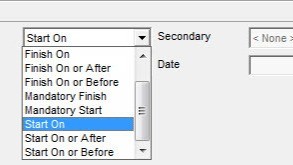
Dans Primavera P6, les contraintes sont des dates fixes que vous assignez à une activité. Elles limitent la date de début ou de fin d'une activité, garantissant ainsi qu'elle ne commencera pas ou ne se terminera pas avant ou après une date spécifiée.
Constraints in Primavera P6 are Date-based restrictions, applied to activities for to guide or force their planning, in addition to (or sometimes to the detriment of) network logic.
Instead of relying solely on activity relationships (FS, SS, etc.), constraints allow you to control the start or end dates directly.
Typical use cases:
- Regulatory requirements (deadlines imposed by authorities)
- Contractual obligations (milestones, payments)
- Resource availability
- External dependencies (approvals, suppliers)
⚠️ Attention: improper use can generate:
- from Negative float
- an unrealistic plan
- a loss of flexibility
Types of Constraints in Primavera P6
The constraints are classified into two main categories:
👉 Hard constraints versus Soft Constraints
1. Hard Constraints
Strict constraints impose fixed dates and often ignoring network logic.
⚠️ Use with caution.
🔴 a. Start On
- Force boot to a specific date
- Ignore predecessors
Example:
Excavation permit from 15/06/2025
🔴 b. Finish On
- Force a completion date
- Can create a negative float
Example:
Structure finished on 30/08/2025 (contract)
🔴 c. Mandatory Start
- Forced start, with no regard for logic
Example:
Commissioning set for 05/01/2026
🔴 d. Mandatory Finish
- Fixed, even if logic indicates otherwise
Example:
Mandatory delivery by 31/12/2026
2. Contraintes souples
Soft constraints guides the planning without breaking the CPM logic.
👉 Recommended in practice
🟢 a. Start On or After (SOOA)
- Cannot start before a date
Example:
Steel assembly after delivery (10/05/2025)
🟢 b. Start on or before
- It must start before a deadline
Example:
Concrete pouring before 01/07/2025
🟢 c. Finish On or After (FOOA)
- Cannot finish before a date
Example:
Tests until 15/12/2025
🟢 d. Finish On or Before
- It must be finished before a date
Example:
Roof covered before 01/11/2025
Hard vs Soft Constraints: key differences
| Criterion | Strong constraints | Soft constraints |
|---|---|---|
| CPM Logic | Ignored | Respected |
| Flexibility | Weak | Raised |
| Risk | Raised (negative float) | Weak |
| Usage | Strict contractual obligations | Piloting and planning |
| Examples | Mandatory Start/Finish, Start On | SOOA, FOOB |
Example: Negative float caused by a constraint
Scenario:
- Activity: Final Testing
- Constraint Finalisation obligatoire – 30/10/2025
- Logical calculation: end on 05/11/2025
Result:
- Float -5 days
Indicate a scheduling conflict / constraint
Best Practices (Expert Level – Delay & Risk Strategy)
✅ 1. Use constraints sparingly
Too many constraints = artificial planning
✅ Prioritise flexible constraints
They maintain the integrity of the CPM model
✅ 3. Monitor the negative float
Critical drift indicator
✅ 4. Justify each constraint
- Contractual
- Regulatory
- Technique
Indispensable in the context of claims
✅ 5. Test the schedule without constraints
Check network logic robustness
Conclusion
Constraints in Primavera P6 are powerful management tools:
- Well used Realistic and controlled planning
- Misused Biased planning and legally fragile
Golden Rule:
Network logic must prevail — constraints must never replace it
In your projects, do you favour hard or soft constraints?
Have you ever managed a schedule with a significant negative float?
 Français
  English (UK)
  Español
  Italiano
  Deutsch
  Nederlands