

 Understanding CPM concepts and calculations Implementing CPM in Primavera P6 Case study of a real-world project The strategic value of CPM in project management
Let’s dive in.
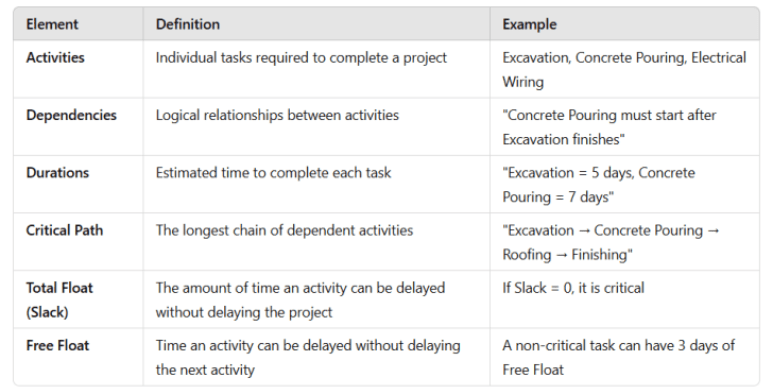
The Critical Path represents the longest sequence of dependent tasks in a project. If any activity on the critical path is delayed, the entire project completion is delayed.
If any activity on the critical path is delayed, the entire project completion is delayed.
Formula to Identify the Critical Path:
Critical Path = Longest Path in the Project Schedule (Total Float = 0 days)
Project Duration = Sum of Activity Durations on the Critical Path
Primavera P6, Primavera P6 is a powerful enterprise-level scheduling tool widely used for complex project planning.
Below is a step-by-step guide to defining the Critical Path in Primavera P6.
Break the project into structured work packages (foundation, structure, finishing, MEP, etc.).
Example: For a construction project, the WBS may include:
Site Preparation
Foundation Work
Structural Work
Finishing & MEP
Under each WBS element, define specific activities.
Example: Under Foundation Work, we may have:
Excavation
Concrete Pouring
Curing & Formwork Removal
Assign logical relationships
Finish-to-Start,
Start-to-Start,
Finish-to-Finish,
Start-to-Finish
Example:
Excavation → Concrete Pouring (Finish-to-Start relationship)
Example:
Excavation: 5 days
Concrete Pouring: 7 days
Curing: 10 days
In Primavera :
Go to "Project" → "Dates", define the start date, and click "Schedule" (F9).
In Gantt Chart :
Go to "Gantt Chart" → Customize Layout → Select Total Float.
Activities with Total Float = 0 are on the Critical Path.
Use Primavera P6 tools to shorten the Critical Path:
Fast-Tracking Fast-Tracking: Overlapping activities to reduce project duration. Allocating extra resources to shorten time. : allocation de ressources supplémentaires Logic Optimization: Adjusting dependencies to streamline execution.
 Duration: 180 days Software Used: Primavera P6
Site Preparation (10 Days)
Excavation (15 Days)
Foundation (20 Days)
Structural Framing (40 Days)
Roofing & External Cladding (25 Days)
MEP Installation (30 Days)
Interior Finishing (35 Days)
Final Inspection & Handover (5 Days)
Site Preparation → Excavation (Finish-to-Start)
Excavation → Foundation (Finish-to-Start)
Foundation → Structural Work (Finish-to-Start)
Critical Path Identified:
 Excavation → Foundation → Structural Work → Roofing → Finishing → Handover
Problem: Excavation delayed by 5 days due to heavy rainfall.
Solution: Applied Fast-Tracking by starting Foundation work in parallel with the final stages of excavation.
Outcome: Saved 4 days of delay, reducing impact on final delivery.
A. Improved Decision-MakingReal-time insights into project schedules allow managers to identify bottlenecks and adjust work sequences.
B. Better Resource ManagemenCPM ensures efficient allocation of manpower, materials, and equipment, reducing downtime and waste.
C. Risk MitigationScenario analysis using CPM helps predict potential delays & risks before they escalate.
D. Enhanced Project Monitoring & ControlCPM integrates withEarned Value Management (EVM) to track schedule & cost performance indices (SPI & CPI).
E. Competitive AdvantageOn-time project completion enhances company reputation, financial performance, and stakeholder trust.
The Critical Path Method (CPM) is a powerful project control tool that provides clarity, efficiency, and control over project execution.
When applied effectively in Primavera P6, it ensures:
 Accurate scheduling and forecasting Proactive delay management Optimized resource allocation Improved risk mitigation
Are you currently using Primavera P6 for scheduling?
What challenges have you faced in managing your Critical Path?
With Primavera P6, project professionals can visualize, track, and manage the critical path dynamically, ensuring that projects remain on schedule and within budget.